Replacing a TMS is one of the highest-stakes operational decisions a freight brokerage makes. Get the platform wrong and the business absorbs rollout friction, workflow workarounds, and billing disruption. Get it right and the team can move more loads with less administrative drag on a cost structure that still makes sense as the brokerage grows.
This guide compares BrokerPro and McLeod Software’s PowerBroker directly. It also gives brokerages evaluating McLeod alternatives a practical framework for deciding which platform fits their size, growth stage, and operational reality.
Quick verdict: BrokerPro vs McLeod at a glance
BrokerPro is a McLeod PowerBroker alternative for freight brokerages that want faster rollout, broker-first workflows, load-volume pricing, and built-in AI automation.
| Evaluation area | BrokerPro | McLeod Software (PowerBroker) |
|---|---|---|
| Best fit | Small-to-mid-size freight brokerages and 3PLs | Larger, process-driven brokerages and transportation operations |
| Typical rollout | BrokerPro reports two to four weeks | Scope varies by products, deployment, integrations, migration, and training |
| Published pricing | From $950 per month | Quote-based; confirm software, implementation, hosting, and services |
| Pricing approach | Load-volume based; no seat limits or feature gates | Confirm products, modules, hosting, services, and ongoing costs in the quote |
| Workflow orientation | Purpose-built for freight brokers and 3PLs | Broad transportation operations across brokers, carriers, and fleets |
| Automation | BrokerPro AI supports carrier sourcing, tracking, and invoice follow-up | Workflow automation and AI across McLeod’s broader product ecosystem |
| Evaluation priority | Adoption speed and broker-first execution | Enterprise depth and configuration fit |
Three factors usually drive the decision:
- Workflow fit. Run your actual dispatch, carrier sourcing, tracking, billing, and exception workflows in each platform. A polished demo is not evidence that the system fits the desk.
- Implementation capacity. Compare the work your team must own before, during, and after go-live—not just the vendor’s target date.
- Cost structure. Model software, implementation, training, hosting, integrations, services, and internal labor over two to three years.
Feature and workflow comparison
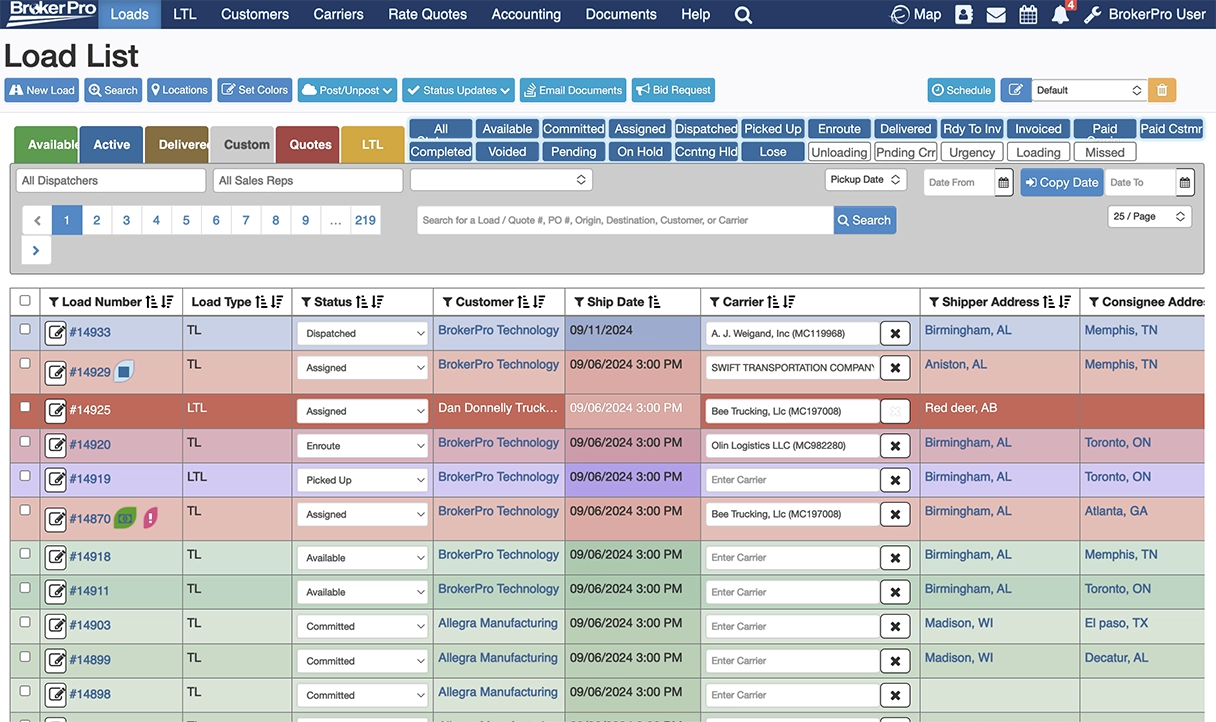
The workflows that matter most to a freight brokerage are not always the ones that receive the most attention in a product demo. Load execution speed, carrier sourcing, billing handoff, visibility, and automation are where platform differences show up in daily work.
| Workflow | BrokerPro | McLeod Software |
|---|---|---|
| Load execution | Broker-first workflow designed to keep execution moving | Broad dispatch and load-lifecycle management for structured operations |
| Carrier sourcing | Load board integrations, preferred-lane data, load offers, and BrokerPro AI for automated carrier outreach | Carrier tools including TopMatch, preferred-lane data, load offers, and partner integrations |
| Shipment tracking | Real-time visibility, geolocation, partner integrations and automated check calls | Brokerage tracking, GPS data, status communication, and partner integrations |
| Document management | Integrated document handling across the load lifecycle | Deep documentation and compliance-oriented workflows |
| Billing and invoicing | Billing workflows plus automated invoice follow-up through BrokerPro AI | Structured accounting, payables, settlements, and back-office tools |
| Reporting | Operational and profitability reporting built for brokerage management | Broad reporting and analytics with configurable metrics |
| Integrations | Load boards, tracking, accounting, payments, onboarding, EDI, and brokerage-specific tools | A broad certified partner ecosystem across trucking and logistics software |
| Implementation | Focused broker rollout with a typical two-to-four-week target | Scope should be confirmed for the selected products, hosting, migration, integrations, and training |
What daily impact looks like
BrokerPro customers report an average 34% increase in load volume after switching. That outcome reflects what happens when a brokerage reduces administrative drag and gives users a workflow they can adopt.
McLeod’s operational depth is real. Its product suite covers pricing, dispatch, carrier management, accounting, EDI, reporting, AI, and integrations across trucking and logistics. For an operation that needs that breadth and has the resources to configure it, PowerBroker can be a legitimate fit. For a growing pure-play brokerage, the important question is whether that breadth creates useful leverage or avoidable process overhead.
BrokerPro AI focuses on three repetitive brokerage tasks: carrier sourcing, shipment tracking, and invoice follow-up. The automation works inside the same platform used to manage loads rather than asking the team to coordinate another disconnected tool.
Pricing structure and cost predictability
BrokerPro publishes its starting price and pricing driver. McLeod does not publish a directly comparable list price, which makes a line-by-line quote especially important.
| Cost question | BrokerPro | McLeod Software |
|---|---|---|
| Starting price | From $950 per month | Contact sales |
| Primary pricing driver | Invoiced load volume | Request a scoped quote for selected products and deployment |
| User seats | No seat limits | Confirm in proposal |
| Feature access | Full platform with no feature gates | Confirm included products, modules, and services |
| Implementation and training | Confirm against your migration scope | Confirm as separate line items |
| Integrations and hosting | Confirm partner-connected fees for your setup | Confirm integrations, hosting, and ongoing service costs |
Why BrokerPro’s model can fit a growing brokerage
- Adding dispatchers, agents, accounting users, or managers does not automatically increase the software bill.
- Published pricing makes the initial cost easy to evaluate before a sales process.
- Full platform access reduces the risk that an important workflow sits behind a higher feature tier.
What to request in a McLeod proposal
- A product and module list tied to the workflows demonstrated.
- Separate pricing for licensing, hosting, implementation, data migration, training, integrations, and professional services.
- The assumptions used for user count, transaction volume, locations, and support.
- Renewal terms and the cost of future configuration or expansion.
The useful question is not simply which platform is cheaper. It is which commercial model matches the team structure and growth plan over the next two to three years.
Why brokerages start looking for McLeod alternatives
The trigger for a TMS replacement is rarely curiosity about features. It is usually operational friction that has built long enough to justify the disruption of switching.
- Workflow rigidity. Daily workarounds have become the normal operating process.
- Tool sprawl. Bolt-ons and manual processes have created unstructured data that is difficult to map into a modern cloud TMS.
- Multiple sources of truth. Disconnected systems, spreadsheets, and email threads must be reconciled before a clean migration can happen.
- Rising administrative overhead. Manual work that was manageable at lower volume no longer scales.
- Integration gaps. Missing or incomplete connections create duplicate entry and unreliable operational handoffs.
- Cost uncertainty. Added products, users, services, and integrations can make total cost difficult to forecast.
The common thread is growth: volume and organizational complexity expose gaps that a smaller operation could once work around.
What to verify before replacing McLeod
The most common migration mistake is spending most of the evaluation on feature comparisons and too little on cutover readiness. A credible McLeod alternative should reduce friction in the first 90 days of operation, not merely look better in a sales demonstration.
1. Data migration quality
Confirm which carrier records, customer records, load history, documents, rates, accounting data, and user permissions will transfer. Define who validates each dataset and what happens when records do not map cleanly.
2. Accounting cutover
Open loads, receivables, payables, outstanding balances, and billing records need reconciliation before go-live. Define the cutoff date, system of record, exception process, and owner for every financial handoff.
3. Integration coverage
Map every system the team touches today: load boards, carrier onboarding, visibility, accounting, EDI, payments, fraud prevention, and customer portals. Confirm both technical availability and implementation responsibility before signing.
4. Workflow fit
Run actual daily scenarios in the proposed configuration—not a scripted walkthrough. Test dispatch, carrier follow-up, document collection, billing handoff, exceptions, and management reporting.
5. Reporting continuity
List the reports leadership and operations use every week. Confirm the fields, filters, permissions, history, and export process available at launch.
6. User training and adoption
Ask how much role-based training each team needs, who provides it, and what support looks like after go-live. A powerful platform only creates value when users can operate it consistently.
Our TMS Buyer’s Guide provides a broader evaluation framework for comparing workflows, pricing, integrations, implementation, and rollout expectations before choosing any TMS.
Build the evaluation around your brokerage
A useful side-by-side evaluation should cover:
- Your current dispatch, billing, tracking, and carrier follow-up workflows.
- Every required integration and who owns its implementation.
- Pricing based on actual load volume, users, products, services, and growth assumptions.
- The implementation timeline, internal resource requirements, and realistic go-live criteria.
- Migration readiness across data, accounting cutover, permissions, reporting, and training.
The right answer depends on operating reality. BrokerPro is built for freight brokers and 3PLs that value a focused rollout, predictable load-volume pricing, and broker-first daily execution. McLeod PowerBroker may be a better fit for a larger or more process-heavy transportation operation that needs broader enterprise depth and has the resources to implement it well.